Why shouldn’t you use public Wi-Fi for sensitive matters? Link to heading
Wi-Fi at cafes, airports, or hotels is convenient, but everyone shares the same public network. This isn’t a problem in and of itself, but under certain circumstances, it poses a serious risk.
What’s the difference between a home network and a public network? Link to heading
On your home router, you’re usually the only administrator. You know who’s connecting to the network, and traffic passes through a trusted device.
On a public network:
- You don’t know who operates the router
- You don’t know who else is connected
- You don’t know if traffic is being recorded
The man-in-the-middle attack Link to heading
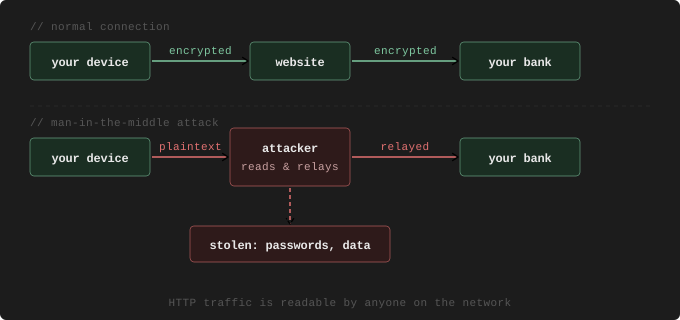
The most common threat on public Wi-Fi is called man-in-the-middle (MITM). The attacker positions themselves on the network between your device and the internet and is able to read or modify the traffic passing between your device and the website you’re visiting. This is particularly dangerous if the connection isn’t encrypted—that is, if it uses HTTP instead of HTTPS. In this case, the traffic literally passes through as plain text.
The Evil Twin Link to heading
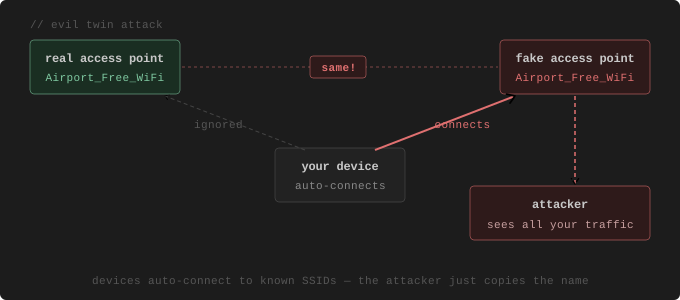
The attacker sets up a network with the same name as a well-known public Wi-Fi network—for example, Airport_Free_WiFi. Devices automatically connect if they have seen this name before. From that moment on, the attacker can see all traffic.
When is the risk greatest? Link to heading
- When entering login credentials on an HTTP page
- When performing banking transactions
- When accessing corporate email at work without a VPN
- When downloading files from unknown sources
HTTPS connections are encrypted—making it harder for a man-in-the-middle to read them. But it’s not impossible, and in the case of a fake access point, the certificate might also be forged, allowing traffic to be decrypted, read, and then re-encrypted.
What should you do if you have to use public Wi-Fi? Link to heading
- Only visit HTTPS sites (the padlock icon in the browser)
- Avoid logging into sensitive accounts
- Turn off automatic Wi-Fi connection
- Use a VPN; this encrypts all traffic, even non-HTTPS connections
- Sharing via mobile data (hotspot) is a safer alternative
Summary Link to heading
Public Wi-Fi isn’t necessarily dangerous, but you can’t trust it. For sensitive activities—such as banking, work, and logging in—it’s best to use your own mobile data or a VPN. The convenience isn’t worth the risk.
This article is part of a series aimed at explaining the basics of online security in simple terms.